Cartoon Happiness

Main Menu

  • Home
  • Caricature
  • Ravens Design Shop
  1. You are here:  
  2. Home
  3. Caricature

How to Turn a Photo Into a Caricature and Keep the Likeness

Turning a photo into a caricature is not simply a matter of making the eyes enormous or stretching the nose. The real challenge is exaggerating the person’s most distinctive features while keeping the face instantly recognizable.

A successful caricature should look humorous, lively, and creative, but it should still feel like the person in the photograph. This balance comes from careful observation, controlled exaggeration, and an understanding of how facial features relate to one another.

Whether you draw with a pencil, tablet, or digital illustration program, the following process can help you create a recognizable caricature from almost any clear portrait photo.

What Creates Likeness in a Caricature?

Likeness is created by more than individual facial features. It comes from the combination of head shape, spacing, proportions, expression, hairstyle, and small identifying details.

Two people may both have large eyes or wide smiles, but the distance between their features, the angle of their eyebrows, the shape of their cheeks, and the way they hold their head may be completely different.

Important principle: A caricature can change the size of facial features, but it should preserve the relationships that make the person recognizable.

Choose the Right Reference Photo

The quality of the reference photograph strongly affects the finished caricature. A clear, expressive image gives the artist more useful information than a dark, blurry, or heavily filtered picture.

A strong reference photo should have:

  • Clear lighting across the face
  • A sharp view of the eyes, nose, and mouth
  • A natural facial expression
  • Minimal distortion from camera filters
  • A visible hairstyle and face outline
  • A front or three-quarter angle

Whenever possible, use several photos of the same person. One image may show the hairstyle clearly, while another may capture the person’s natural smile or usual expression.

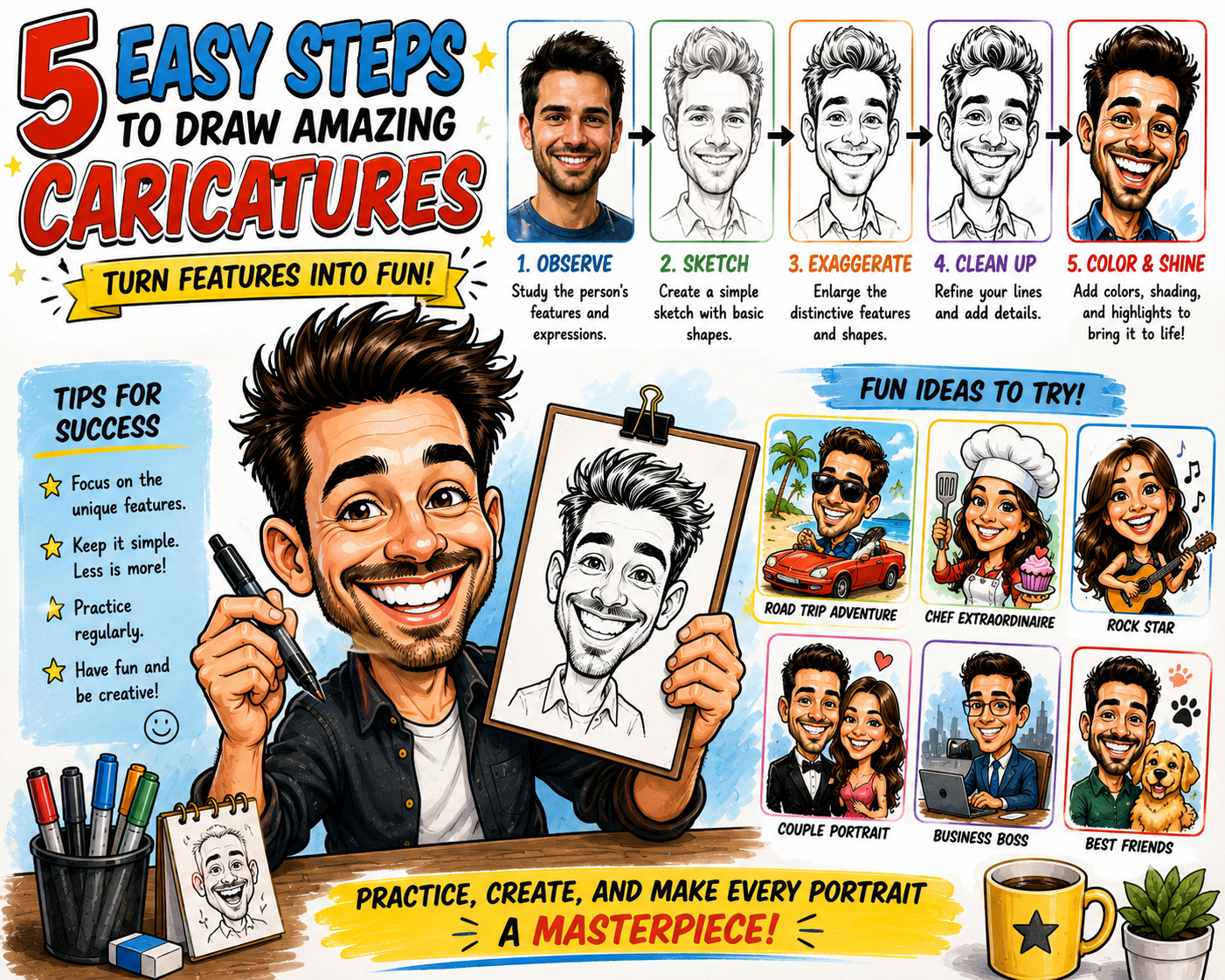
Step-by-Step: How to Turn a Photo Into a Caricature

Step 1: Study the Overall Head Shape

Before drawing individual features, look at the outside shape of the head. Decide whether the face is round, square, long, narrow, heart-shaped, triangular, or pear-shaped.

Observe the width of the forehead, fullness of the cheeks, shape of the jaw, and length of the chin. These large shapes are often more important to likeness than small details.

Sketch the head lightly using a simple geometric form. Avoid starting with the same oval for every person.

Step 2: Mark the Facial Guidelines

Draw a vertical centerline and horizontal guides for the eyes, nose, and mouth. These guidelines help maintain the natural relationship between the features.

Notice whether the eyes sit high or low on the face, whether the nose is long or short, and how much space appears between the mouth and chin.

The placement of these features can make a portrait recognizable even before detailed lines are added.

Step 3: Identify the Most Distinctive Features

Ask which features catch your attention first. These are usually the best candidates for exaggeration.

Distinctive features may include:

  • A broad or crooked smile
  • Large, narrow, or deeply set eyes
  • A curved, pointed, wide, or short nose
  • Rounded cheeks or a strong jaw
  • Thick or sharply angled eyebrows
  • A high forehead or low hairline
  • Large glasses or unusual facial hair
  • A memorable hairstyle

Write down the two or three strongest observations before you begin exaggerating.

Step 4: Create a Simple First Sketch

Draw the face with only basic shapes. Use circles, curves, boxes, and triangles to establish the overall design.

Keep the first sketch loose. Do not worry about eyelashes, wrinkles, hair strands, or clothing details yet.

At this stage, your goal is to test the head shape, expression, and spacing of the features.

Step 5: Exaggerate One Feature at a Time

Begin by changing the strongest feature slightly. Make the smile wider, the cheeks fuller, the nose longer, or the eyes larger.

Then compare the sketch with the photo. If the person remains recognizable, you can push the exaggeration a little further.

Avoid changing every feature at once. Too many exaggerated elements can compete with one another and weaken the likeness.

Step 6: Use Opposites to Strengthen the Design

Caricature artists often create contrast by making one feature large and another small. A large forehead may be paired with a smaller lower face. Full cheeks may be contrasted with a narrow chin.

If the eyes are enlarged, the nose or mouth may be simplified. If the hairstyle becomes very large, the body may be drawn smaller.

These contrasts make the caricature more dynamic without requiring every feature to be distorted.

Step 7: Preserve Important Spacing

The spaces between features are an important part of likeness. Notice how far apart the eyes are, where the nose sits in relation to the mouth, and how much space appears below the lower lip.

You can enlarge or reduce features while preserving these relationships. This helps the caricature remain believable and recognizable.

Step 8: Capture the Natural Expression

Expression is one of the strongest sources of personality. Study how the eyes, eyebrows, cheeks, and mouth work together.

A genuine smile often raises the cheeks and narrows the eyes. A surprised expression may lift the eyebrows and open the mouth. A confident expression may involve a slight head tilt or uneven smile.

Avoid replacing the person’s natural expression with a generic cartoon grin.

Step 9: Add Hair, Glasses, and Personal Details

Hairstyle, facial hair, glasses, earrings, hats, and other accessories can be essential to recognition.

Focus on the large shape of the hair instead of drawing every strand. Exaggerate the volume, curl pattern, hairline, or direction when those elements are distinctive.

Keep accessories clear and simple so they strengthen the portrait without covering the face.

Step 10: Refine the Drawing

Once the exaggeration and likeness feel balanced, create cleaner lines over the rough sketch. Simplify unnecessary details and strengthen the most important shapes.

Use thicker lines around the outer head, hair, and body. Use thinner lines for eyes, wrinkles, teeth, and small facial details.

Step back regularly and compare the drawing with the original photograph.

Step 11: Add Color and Shading

Apply skin tone, hair color, clothing, and accessories. Keep the color areas clean and easy to read.

Add simple shadows under the hair, eyebrows, nose, chin, and clothing folds. Highlights in the eyes and hair can make the portrait feel more lively.

Caricatures usually benefit from simple, bold color rather than overly realistic rendering.

Step 12: Check the Likeness Before Finishing

Ask yourself whether the person would be recognizable without the clothing or background. If not, review the head shape, expression, and spacing of the main features.

You may need to reduce one exaggeration, strengthen another, or correct the relationship between the eyes, nose, and mouth.

What Should You Exaggerate?

The best feature to exaggerate is not always the largest one. It is the feature that contributes most strongly to the subject’s identity.

Observation Possible Exaggeration
Wide, cheerful smile Increase the width, raise the cheeks, and emphasize dimples
Long, narrow face Stretch the head shape and reduce the width
Large, expressive eyes Enlarge the eyes while simplifying nearby features
Strong jaw and small forehead Widen the lower face and reduce the upper face
Curly or tall hairstyle Increase the volume and simplify the curls into bold shapes
Distinctive glasses Enlarge or strengthen the frames while preserving their shape
Raised eyebrow or uneven smile Emphasize the natural asymmetry

Why Exaggerating Everything Can Ruin the Likeness

Beginners often believe a caricature must distort every part of the face. This usually creates visual confusion.

When the eyes, nose, mouth, ears, chin, and hair are all enlarged, no single feature remains dominant. The face may become funny, but it may no longer resemble the subject.

Selective exaggeration is more effective. Choose two or three important features and allow the others to support them.

Use Asymmetry to Improve Recognition

Human faces are naturally asymmetrical. One eye may sit slightly higher, one eyebrow may curve differently, or one side of the mouth may rise more than the other.

These small irregularities can be very important to likeness. Do not automatically make both sides of the face identical.

Natural asymmetry often gives a caricature more personality and life.

Traditional vs. Digital Photo-to-Caricature Methods

Traditional Drawing

Traditional caricatures can be created with pencil, ink, markers, colored pencils, or paint. Drawing by hand helps artists develop observation skills and confident line work.

The artist must plan proportions carefully because major changes can be harder to correct after the drawing is inked or colored.

Digital Drawing

Digital tools make it easier to enlarge, shrink, move, rotate, or reshape features. Artists can use layers for the photograph, sketch, clean lines, color, shadows, and background.

Digital drawing is especially useful for custom commissions because colors, clothing, text, and background details can be revised more easily.

Both methods rely on the same artistic principles: observation, shape, proportion, expression, and selective exaggeration.

Automatic Caricature Filters vs. Custom Artwork

Automatic filters can quickly apply cartoon effects or distort parts of a face. They can be entertaining and useful for generating ideas.

However, automatic software may enlarge features randomly or apply the same effect to every person. It may not recognize which details are most important to the subject’s likeness.

Custom caricature artwork gives the artist control over expression, exaggeration, personality, clothing, hobbies, and background elements.

How to Make the Caricature Flattering

A caricature does not have to be harsh. Many personalized portraits are designed to be cheerful, affectionate, and flattering.

To create a friendly caricature:

  • Emphasize the smile and positive expression
  • Use bright, inviting colors
  • Avoid exaggerating sensitive features too aggressively
  • Include favorite clothing, hobbies, or pets
  • Use a confident or playful pose
  • Keep wrinkles and skin texture simple

The level of exaggeration should match the purpose of the artwork and the personality of the subject.

Common Photo-to-Caricature Mistakes

Using a Poor Reference Photo

A dark, blurry, heavily filtered, or extreme-angle image can hide important facial information.

Starting With Small Details

Drawing eyelashes, teeth, wrinkles, or hair strands before establishing the head shape can lead to weak proportions.

Ignoring the Expression

A technically accurate face may still feel unlike the person if the natural smile, eyebrow position, or head tilt is missing.

Making the Face Too Symmetrical

Perfect symmetry can remove the small irregularities that make the subject recognizable.

Depending Entirely on a Filter

Automatic effects may create a cartoon appearance, but they do not always preserve personality or meaningful likeness.

Adding Too Many Background Details

A crowded setting can distract viewers from the face. Keep the composition focused on the subject.

A Simple Practice Exercise

Choose one clear portrait photograph and create three quick sketches.

  1. In the first sketch, exaggerate only the head shape.
  2. In the second sketch, exaggerate the strongest facial feature.
  3. In the third sketch, combine the strongest parts of the first two versions.

Compare all three drawings with the photograph. Decide which version is most recognizable and why.

Practice tip: Work quickly and avoid polishing the sketches. The goal is to study likeness and exaggeration, not create a finished portrait.

Ideas for Personalized Caricatures From Photos

Once the face is recognizable, you can add a small body, meaningful props, and a personalized setting.

  • A wedding couple in formal clothing
  • A family with their pets
  • A musician performing on stage
  • A golfer celebrating a successful shot
  • A gardener surrounded by flowers
  • A graduate holding a diploma
  • A retiree enjoying a favorite hobby
  • A business owner standing beside a company sign
  • A traveler visiting a favorite destination
  • A birthday portrait with decorations and gifts

These personal details transform a simple face study into a memorable gift or keepsake.

Frequently Asked Questions

What makes a caricature look like the person?

A caricature preserves the subject’s head shape, facial spacing, expression, and distinctive features, even when certain proportions are enlarged or reduced.

Which feature should I exaggerate first?

Begin with the feature that catches your attention first. This may be the smile, nose, eyes, cheeks, chin, eyebrows, glasses, or hairstyle.

How much should I exaggerate?

Start with a subtle change and compare the drawing with the photograph. Increase the exaggeration gradually while checking that the person remains recognizable.

Can beginners make caricatures from photographs?

Yes. Beginners can use simple shapes, facial guidelines, and one or two controlled exaggerations to create recognizable results.

Is digital drawing easier than drawing by hand?

Digital tools make revisions easier because artists can resize, move, undo, and separate features into layers. Traditional drawing is valuable for learning observation and line control.

Can a caricature be realistic?

Yes. Some caricatures use realistic shading, textures, and color while still exaggerating the proportions of the face.

Should I trace the photograph?

Tracing can help study placement, but copying the photograph exactly will not create much exaggeration. Use the reference to understand the face, then rebuild it with simplified and exaggerated shapes.

Final Thoughts

Learning how to turn a photo into a caricature requires more than distortion. The artist must understand which shapes, expressions, and proportions make the person unique.

Begin with a clear photograph, study the overall head shape, identify the strongest features, and exaggerate them gradually. Preserve important spacing, include natural asymmetry, and capture the person’s familiar expression.

With regular practice, you can create caricatures that are funny, expressive, and unmistakably recognizable.
Caricature Related Articles

  • 20 Caricature Artist Tips for Capturing Personality
  • Best Digital Caricature Software for Funny Portraits
  • Biggest Caricature Drawing Mistakes Beginners Make
  • Caricature vs. Cartoon: What’s the Difference?
  • Fun Caricature Ideas for Families, Weddings and Gifts
  • History of Caricature Art: From Early Sketches to Digital Portraits
  • How AI Is Changing Caricature Art and Digital Portraits
  • How to Draw a Caricature: Beginner Step-by-Step Guide
  • How to Make Money Drawing Caricatures Online and at Events
  • How to Turn a Photo Into a Caricature and Keep the Likeness

Best Digital Caricature Software for Funny Portraits

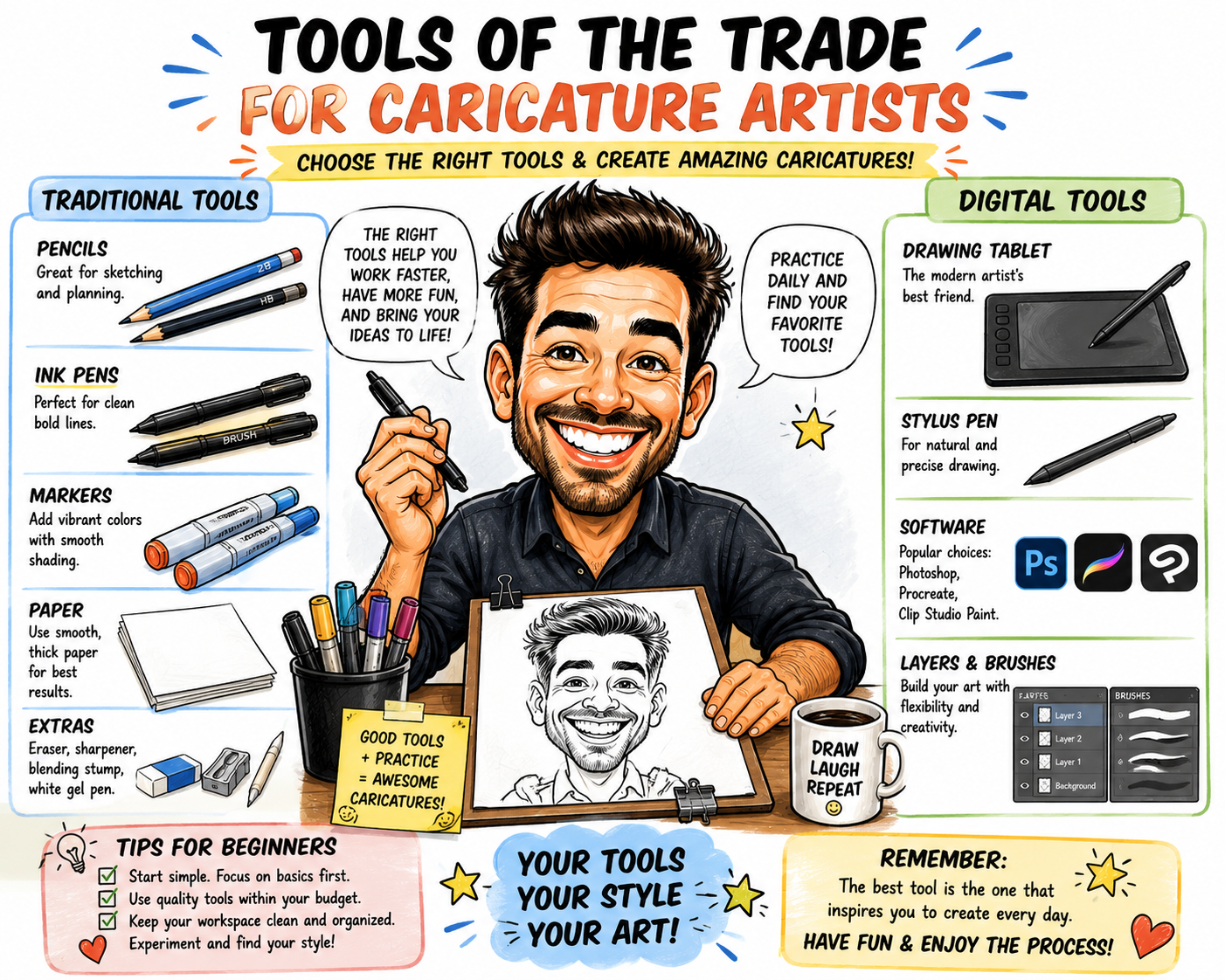
Digital caricature art combines portrait drawing, creative exaggeration, and modern technology. With the right software, artists can enlarge smiles, reshape faces, experiment with expressions, add colorful backgrounds, and correct mistakes without starting over.

There are many digital drawing programs available, but the best caricature software depends on your experience, preferred device, artistic style, and budget. Some programs are designed for detailed painting, while others specialize in smooth line art, simple cartoon portraits, or fast mobile drawing.

This guide compares popular digital art programs and explains what to look for when choosing software for funny portraits and personalized caricatures.

What Is Digital Caricature Art?

A digital caricature is an exaggerated portrait created on a computer, tablet, or mobile device. The artist studies a real person and emphasizes the facial features, expressions, accessories, or personality traits that make the subject recognizable.

A person with a wide smile may receive an even larger grin. Someone with distinctive glasses, curly hair, expressive eyebrows, or a strong chin may have those features emphasized.

Digital tools allow artists to sketch on separate layers, resize features, move facial elements, test colors, add textures, and prepare finished artwork for printing or online sharing.

What to Look for in Caricature Drawing Software

Caricature artists do not necessarily need the most expensive program. They need software that supports their preferred creative process.

Useful features include:

  • Pressure-sensitive brushes
  • Multiple drawing layers
  • Selection and transformation tools
  • Customizable pens and pencils
  • Color adjustment controls
  • Blending and shading tools
  • High-resolution canvas sizes
  • Common export formats such as PNG, JPEG, PDF, and layered files
  • Reference image support
  • Easy undo and revision controls
Helpful tip: Choose a program that feels comfortable to use. A simple application you enjoy practicing with may be more valuable than a complicated program filled with features you rarely need.

Popular Digital Caricature Software Compared

Software Best For Skill Level Main Advantage
Adobe Photoshop Detailed painting and photo-based artwork Intermediate to advanced Powerful editing and transformation tools
Procreate Portable iPad drawing Beginner to professional Natural drawing experience and simple interface
Clip Studio Paint Line art, cartoons, comics, and illustration Beginner to advanced Strong inking, brush, and reference tools
Krita Free digital painting Beginner to advanced Capable open-source art tools
Adobe Fresco Touchscreen drawing and painting Beginner to intermediate Portable sketching with natural brush effects
Vector Illustration Software Clean, scalable cartoon portraits Intermediate Artwork can be resized without losing sharpness

1. Adobe Photoshop

Best for Detailed Caricature Painting and Photo Editing

Adobe Photoshop is a versatile option for artists who want to combine drawing, painting, photo editing, and facial transformation in one program.

Artists can place a reference photograph on one layer, create a sketch on another, and add line art, color, shading, and background elements on additional layers. Selection and transformation tools make it possible to enlarge eyes, reshape the jaw, widen a smile, or adjust the overall head shape.

Photoshop is especially useful for painted caricatures, highly detailed portraits, promotional illustrations, and artwork that combines photographs with hand-drawn elements.

The large number of tools may feel overwhelming to a complete beginner. New artists can begin with only a few basics: brush, eraser, layers, selection, transform, and color controls.

Good choice for: Professional commissions, detailed painting, photo manipulation, advertising artwork, and print-ready caricatures.

2. Procreate

Best for Drawing Caricatures on an iPad

Procreate is popular with artists who prefer drawing directly on an iPad. Its touchscreen controls and streamlined interface make it easy to sketch, ink, color, and refine a portrait without being tied to a desktop computer.

Artists can import a photograph, reduce its opacity, and sketch on a new layer. Features for stabilizing lines, creating shapes, managing layers, and customizing brushes can help produce both loose caricature sketches and polished illustrations.

Procreate works well for event sketches, social media portraits, personalized gifts, and artists who enjoy drawing while traveling.

Good choice for: iPad users, portable drawing, quick portraits, colorful illustrations, and artists who prefer a natural sketching experience.

3. Clip Studio Paint

Best for Clean Line Art, Cartoons, and Comics

Clip Studio Paint is designed for illustration, character art, comics, and animation. It is particularly useful for caricature artists who value smooth line work and adjustable drawing tools.

Its brush controls can help artists create bold outlines, delicate facial details, expressive hair, and confident ink strokes. Artists can also use reference materials and pose tools when building a full-body caricature.

This software is a strong option for people who want to turn caricature characters into comic panels, greeting cards, stickers, web illustrations, or short animations.

Good choice for: Cartoon-style caricatures, comic illustrations, smooth inking, character design, and artwork that may later be animated.

4. Krita

Best Free Software for Digital Caricature Painting

Krita is a free, open-source digital painting program. It provides brushes, layers, color tools, selection controls, and other features artists can use to create caricatures from beginning to end.

The program is useful for beginners who want to explore digital art without immediately paying for a subscription or premium application.

Artists can use Krita for pencil-style sketches, inked cartoon portraits, painted caricatures, and colorful illustrations. Because it is a full digital painting program, there may still be a learning curve, but tutorials and regular practice can make the interface easier to understand.

Good choice for: Budget-conscious artists, students, hobbyists, desktop users, and anyone looking for capable free painting software.

5. Adobe Fresco

Best for Touchscreen Sketching and Natural Brush Effects

Adobe Fresco is designed for drawing and painting on touch and stylus devices. Its portable workflow makes it useful for sketching faces, testing exaggerations, and creating expressive painted portraits.

Caricature artists can use separate layers for construction lines, clean drawing, color, shadows, and highlights. Natural-looking brush effects can give finished portraits a watercolor, ink, pencil, or painted appearance.

Good choice for: Touchscreen artists, portable sketching, painterly portraits, and people who want a straightforward drawing environment.

6. Vector Illustration Software

Best for Clean and Scalable Cartoon Portraits

Vector illustration software creates artwork with editable paths and shapes rather than traditional painted pixels. This allows the finished image to be enlarged for posters, banners, signs, shirts, and merchandise without becoming blurry.

Vector tools are useful for simplified caricatures with bold outlines, flat colors, clean shadows, and graphic shapes. They are also practical for business mascots, logos, stickers, promotional artwork, and product designs.

Drawing with vector paths can feel less natural than sketching with a digital pencil. Many artists create the original sketch in a painting program and then rebuild or trace the design with vector tools.

Good choice for: Merchandise, logos, large-format printing, stickers, business mascots, and polished cartoon portraits.

What Is the Best Free Caricature Software?

Krita is one of the strongest free choices for artists who want a complete digital painting environment. It can be used for sketches, line art, color, shading, and high-resolution finished illustrations.

Simple browser-based drawing applications can also help beginners practice, but they may provide fewer brush controls, layers, export choices, and professional editing features.

When choosing a free program, make sure it supports the canvas size and file type needed for your project. Artwork intended for printing generally requires a larger canvas than an image created only for social media.

What Is the Best Caricature App for Beginners?

Beginners should look for a program with a clear interface, simple layer controls, brush stabilization, easy resizing, and a reliable undo feature.

Procreate can be approachable for artists who already own a compatible iPad and stylus. Krita is a practical option for people who want to begin on a desktop or laptop without purchasing drawing software.

The easiest application is usually the one that works well with the equipment you already own.

Do You Need a Drawing Tablet?

A drawing tablet is not absolutely required, but it can make digital caricature drawing feel more natural. Pressure sensitivity allows artists to create thin and thick lines by changing how firmly they press the stylus.

A pen display lets the artist draw directly on the screen. A traditional graphics tablet requires the artist to draw on the tablet while looking at a separate monitor.

Beginners can also practice with a touchscreen, mouse, or trackpad. However, a stylus generally provides better control for facial lines, hair, eyes, and small expressions.

How to Create a Digital Caricature From a Photo

Step 1: Select a Clear Reference Photo

Choose a sharp, well-lit image that clearly shows the face. A natural smile or expressive pose will usually produce a more interesting caricature than a stiff identification-style photograph.

Step 2: Study the Head Shape

Decide whether the face is round, narrow, long, square, triangular, or heart-shaped. The overall head shape should guide the rest of the portrait.

Step 3: Identify Distinctive Features

Look for the features that make the person recognizable. These may include the smile, eyes, nose, cheeks, chin, eyebrows, hairstyle, glasses, or facial hair.

Step 4: Create a Rough Sketch

Use a light pencil-style brush to explore different exaggerations. Avoid adding small details too early.

Step 5: Transform and Adjust

Use selection and transformation tools to test larger eyes, a wider smile, fuller cheeks, or a different head proportion. Make changes gradually so the subject remains recognizable.

Step 6: Add Clean Line Art

Create a new layer and trace the strongest lines with a smooth pen or ink brush. Use thicker lines around the outer silhouette and thinner lines for facial details.

Step 7: Apply Color and Shading

Place flat colors beneath the line-art layer. Add simple shadows under the hair, nose, chin, and clothing to create depth.

Step 8: Add Personality

Include clothing, accessories, hobbies, pets, or background details that tell viewers something about the person.

Step 9: Export the Final Artwork

Save an editable version with its layers intact. Export a separate PNG or JPEG copy for online sharing or printing.

Automatic Photo Effects vs. Hand-Drawn Caricatures

Some applications can automatically apply cartoon filters or alter facial proportions. These tools are useful for entertainment, quick experiments, and creative inspiration.

However, automatic effects may exaggerate features randomly. They may not understand which facial details are most important to the subject's likeness or personality.

A hand-drawn caricature gives the artist more control. The artist can decide which features to emphasize, how flattering or humorous the result should be, and which personal details belong in the finished scene.

How AI Can Assist a Caricature Artist

AI-assisted tools can help artists explore composition ideas, background concepts, color combinations, costumes, and possible character poses. They can also provide inspiration for different visual styles.

The artist should still make deliberate creative decisions. A successful caricature depends on observation, recognizable likeness, meaningful exaggeration, and an understanding of the subject's personality.

AI is most useful as part of a larger creative workflow rather than as a replacement for artistic judgment.

Recommended Layer Setup

A simple digital caricature file can use the following layer structure:

  1. Reference layer: The original photograph.
  2. Rough sketch layer: Basic shapes and exaggeration ideas.
  3. Clean line-art layer: Final outlines and facial details.
  4. Flat color layer: Skin, hair, clothing, and accessories.
  5. Shadow layer: Simple depth and form.
  6. Highlight layer: Eyes, hair, skin, and shiny objects.
  7. Background layer: Setting, shapes, or decorative color.

Naming each layer can save time when revising a commission or preparing artwork for a customer.

Choosing Software for Professional Caricature Work

Artists who plan to sell digital caricatures should consider more than drawing features. The software should support large canvas sizes, organized layers, accurate color, common file formats, and reliable backups.

Clients may request changes to clothing, text, colors, facial expressions, or background objects. A well-organized digital file makes those revisions easier.

Artists creating merchandise may benefit from vector artwork, transparent backgrounds, and high-resolution exports. Artists producing printable portraits should confirm the required dimensions before beginning.

Tips for Better Digital Caricatures

  • Spend time observing before you begin drawing.
  • Exaggerate only the most distinctive features.
  • Use separate layers for sketching, line art, color, and shading.
  • Flip the canvas occasionally to spot proportion problems.
  • Zoom out regularly to check the overall likeness.
  • Keep a copy of the original layered file.
  • Use high-resolution settings for printable artwork.
  • Practice several versions of the same face.
  • Use accessories and poses to communicate personality.
  • Avoid depending entirely on automatic filters.

Frequently Asked Questions

What is the best software for drawing caricatures?

The best choice depends on your device and artistic style. Photoshop is useful for detailed editing and painting, Procreate is convenient for iPad drawing, Clip Studio Paint is strong for line art and illustration, and Krita is a capable free option.

Can beginners create digital caricatures?

Yes. Beginners can start with a simple drawing application, a clear reference photograph, and separate layers for the sketch, line art, color, and shading.

Do I need to know how to draw realistic portraits?

Realistic portrait experience is helpful but not required. Understanding head shapes, facial proportions, expressions, and distinctive features is more important than producing perfect realism.

Can I turn a photograph into a caricature automatically?

Some tools can apply automatic cartoon or distortion effects. Hand-drawn adjustments usually create a more personal and recognizable result because the artist controls which features are exaggerated.

What file format should I use?

Keep an editable layered file for future changes. Export PNG files when you need transparency and JPEG files for simple online sharing. Printing requirements may vary depending on the product and service.

Can I sell digital caricatures created with drawing software?

Artists commonly sell personalized caricatures as downloadable portraits, printed gifts, event artwork, social media images, business illustrations, and merchandise. Always follow the software's licensing terms and obtain permission to use reference photographs.

Final Thoughts

The best digital caricature software is the program that fits your device, budget, experience, and creative goals. Photoshop offers extensive editing options, Procreate provides a portable iPad workflow, Clip Studio Paint supports expressive line art, and Krita gives artists a capable free alternative.

No program can replace careful observation. Strong caricatures come from identifying the subject's most recognizable features, exaggerating them with purpose, and using expression, color, pose, and personal details to tell a visual story.

Begin with the tools you already have, practice with different faces, and gradually build a digital workflow that helps you create funny portraits filled with personality.

Caricature Related Articles

  • 20 Caricature Artist Tips for Capturing Personality
  • Best Digital Caricature Software for Funny Portraits
  • Biggest Caricature Drawing Mistakes Beginners Make
  • Caricature vs. Cartoon: What’s the Difference?
  • Fun Caricature Ideas for Families, Weddings and Gifts
  • History of Caricature Art: From Early Sketches to Digital Portraits
  • How AI Is Changing Caricature Art and Digital Portraits
  • How to Draw a Caricature: Beginner Step-by-Step Guide
  • How to Make Money Drawing Caricatures Online and at Events
  • How to Turn a Photo Into a Caricature and Keep the Likeness

20 Caricature Artist Tips for Capturing Personality

A great caricature does more than exaggerate a large nose, bright smile, or unusual hairstyle. It captures the personality, mood, and energy of the person being drawn.

Professional caricature artists study how people smile, move, dress, react, and express themselves. They look beyond individual facial features and search for the qualities that make each person memorable.

Whether you are drawing from a photograph or sketching someone live, the following caricature artist tips can help you create portraits that are funny, expressive, and immediately recognizable.

What Makes a Caricature Feel Like the Person?

Likeness is important, but personality gives a caricature life. Two people may have similar eyes, noses, or face shapes, yet their expressions and mannerisms can be completely different.

One person may appear cheerful and energetic, while another looks thoughtful and reserved. A successful caricature communicates these differences through facial expression, pose, clothing, and exaggerated features.

Key idea: Do not ask only, “What does this person look like?” Also ask, “What makes this person feel unique?”

20 Professional Caricature Artist Tips

  1. Observe before drawing.
  2. Identify the strongest feature.
  3. Study the overall head shape.
  4. Preserve the relationship between features.
  5. Pay attention to expressions.
  6. Use the eyebrows to show emotion.
  7. Capture the natural smile.
  8. Look for asymmetry.
  9. Exaggerate selectively.
  10. Use contrast between large and small shapes.
  11. Include the hairstyle.
  12. Show recognizable accessories.
  13. Match the pose to the personality.
  14. Use hobbies and careers as visual clues.
  15. Keep the body simple.
  16. Use confident lines.
  17. Avoid unnecessary detail.
  18. Check the silhouette.
  19. Compare the drawing with the reference.
  20. Practice the same face several ways.

1. Observe Before You Start Drawing

Professional artists do not immediately begin with the eyes or nose. They first spend time studying the person.

Look at the head shape, posture, hairstyle, expression, and distance between facial features. Notice what catches your attention first.

A few minutes of careful observation can prevent you from exaggerating the wrong feature.

2. Identify the Strongest Feature

Most faces have one or two features that stand out. It may be a wide smile, rounded cheeks, heavy eyebrows, a narrow chin, or large glasses.

These dominant features provide a natural starting point for the caricature. Emphasizing them can make the person recognizable before you add smaller details.

3. Study the Overall Head Shape

The shape of the head is often more important than individual facial details. Look at the width of the forehead, fullness of the cheeks, jawline, and length of the chin.

Instead of starting with a standard oval, ask whether the head appears round, square, triangular, pear-shaped, narrow, or long.

Exaggerating the correct head shape creates a strong foundation for the portrait.

4. Preserve the Relationship Between Features

A caricature can change proportions while still preserving the basic relationship between the features.

For example, the eyes may sit close together, the nose may be positioned low on the face, or the mouth may be unusually close to the chin.

Maintaining these relationships helps preserve likeness even when the drawing becomes highly exaggerated.

5. Pay Attention to Expressions

Personality often appears most clearly through expression. A relaxed smile, raised eyebrow, tilted head, or thoughtful gaze can say more than a perfectly rendered nose.

Avoid giving every subject the same generic smile. Study how the person naturally expresses happiness, surprise, confidence, or concentration.

6. Use the Eyebrows to Show Emotion

Eyebrows are powerful storytelling tools. Their angle, height, thickness, and curve can completely change the mood of a face.

Raised eyebrows may suggest excitement or surprise. Angled eyebrows can suggest determination, mischief, or confidence. Softly curved eyebrows can create a calm and friendly expression.

7. Capture the Person’s Natural Smile

Smiles vary greatly from person to person. Some people show many teeth, while others smile mostly with their eyes. Some have deep dimples, raised cheeks, or a crooked smile.

Study the width, curve, and energy of the smile rather than drawing a standard cartoon mouth.

A familiar smile can make a caricature feel instantly personal.

8. Look for Natural Asymmetry

Real faces are not perfectly symmetrical. One eyebrow may sit higher, one eye may be slightly smaller, or one side of the smile may rise more than the other.

These small differences often contribute strongly to likeness. Including them can make a caricature feel more natural and recognizable.

9. Exaggerate Selectively

Professional caricature artists rarely enlarge every feature. Instead, they choose a few elements that best represent the subject.

If the eyes are very large, the artist may simplify the nose and mouth. If the chin is the dominant feature, the forehead may be drawn smaller to increase contrast.

Helpful rule: Exaggerate what is already visually distinctive instead of inventing a feature that is not there.

10. Use Contrast Between Large and Small Shapes

Contrast creates energy in caricature art. A large head paired with a tiny body is a familiar example, but the same technique can be used within the face.

Large cheeks may be contrasted with a small chin. A wide hairstyle may be paired with a narrow face. Large glasses may surround small eyes.

These differences make the design more playful and visually memorable.

11. Include the Hairstyle

Hair is often one of the quickest ways to identify a person. Focus on the overall shape, volume, direction, and texture.

Curly hair can become a collection of bold rounded forms. Tall hair can become even taller. A distinctive hairline, part, ponytail, or beard can be emphasized.

Avoid drawing every strand. Strong shapes usually work better in caricature art.

12. Show Recognizable Accessories

Glasses, hats, earrings, necklaces, bow ties, and other accessories can strengthen a person’s identity.

If someone wears the same style of glasses every day, those glasses may be almost as recognizable as their facial features.

Accessories should support the portrait without distracting from the face.

13. Match the Pose to the Personality

Body language can communicate whether someone is energetic, relaxed, confident, shy, playful, or serious.

An outgoing person might be shown with open arms and a broad smile. A thoughtful person might hold a book or rest a hand beneath the chin. A lively entertainer might be captured in motion.

The pose should feel appropriate for the individual.

14. Use Hobbies and Careers as Visual Clues

Personalized caricatures often include objects connected to the subject’s hobbies, job, or lifestyle.

A gardener might hold a watering can. A musician may be shown with a guitar. A chef can stand beside a large mixing bowl, while a traveler may appear with a suitcase and camera.

These objects help tell the person’s story and add meaning to the artwork.

15. Keep the Cartoon Body Simple

In many caricatures, the face is the main attraction. A smaller and simpler body prevents clothing and anatomy from competing with the portrait.

Use a clear pose, a few clothing details, and one or two meaningful props. The body should support the personality rather than overwhelm the composition.

16. Use Confident Lines

Strong, flowing lines can make a caricature feel energetic and professional. Repeated scratchy lines may make the drawing appear uncertain.

Begin with light construction lines, then refine the final drawing with cleaner strokes. Vary the thickness of your lines to create emphasis and depth.

17. Avoid Unnecessary Detail

Too much detail can weaken a caricature. Tiny wrinkles, individual hairs, and complicated clothing patterns may distract from the features that create likeness.

Simplify everything that does not help identify the subject or communicate personality.

Clear shapes and expressions often have more impact than realistic detail.

18. Check the Silhouette

A strong caricature should remain visually interesting even when viewed as a simple outline.

Look at the outer shape of the head, hair, ears, shoulders, and pose. If the silhouette is distinctive, the drawing will often feel stronger and easier to recognize.

19. Compare the Drawing With the Reference

Step back from the artwork regularly and compare it with the photograph or live subject.

Ask whether the head shape is accurate, the expression feels natural, and the dominant features are still recognizable.

It can also help to view the drawing from a distance or temporarily flip a digital canvas. A fresh view often reveals proportion problems.

20. Practice the Same Face Several Ways

One of the best ways to improve is to draw multiple versions of the same person.

In the first sketch, emphasize the eyes. In the second, focus on the head shape. In the third, exaggerate the smile, chin, or hairstyle.

Comparing several versions helps you discover which features best preserve the person’s likeness and personality.

How to Capture Personality From a Photograph

Drawing from a photograph can be challenging because a single image captures only one moment. Whenever possible, choose a photo with a natural expression instead of a stiff pose.

Look for clues in the person’s clothing, posture, eyes, smile, and surroundings. Additional photographs can help you understand how the person normally looks and behaves.

For custom commissions, asking about the subject’s hobbies, occupation, favorite activities, and sense of humor can provide valuable inspiration.

How to Capture Personality During a Live Caricature

Live caricature artists often have only a few minutes to study each subject. They must quickly identify the dominant feature and natural expression.

Brief conversation can help the artist understand the person’s energy. A relaxed discussion may reveal whether the subject is playful, quiet, confident, or enthusiastic.

Quick observation and simple design choices are often more valuable than detailed rendering during a live event.

Common Mistakes That Hide Personality

Using the Same Expression for Everyone

Repeating the same smile or eye shape can make different subjects look too similar.

Focusing Only on the Nose

A distinctive nose can be useful, but personality usually comes from the entire face, expression, pose, and context.

Exaggerating Too Harshly

Overly aggressive exaggeration may feel unflattering or reduce the subject’s likeness. Match the level of humor to the purpose of the artwork.

Ignoring Body Language

A strong face placed on a stiff body can make the finished caricature feel lifeless.

Adding Too Many Props

Props should help tell the story. Too many objects can make the composition crowded and distract from the portrait.

A Simple Caricature Practice Exercise

Choose a clear photograph and write down five observations before drawing. For example:

  • The face is wide and round.
  • The eyebrows are thick and curved.
  • The smile is broad and slightly uneven.
  • The glasses are large and square.
  • The hair rises high above the forehead.

Create three quick sketches. Change the level of exaggeration in each version, then compare which drawing best captures the person.

Practice goal: Spend more time observing and less time adding detail. Strong observation usually leads to a stronger caricature.

Frequently Asked Questions

How do caricature artists make people recognizable?

They preserve important relationships between facial features while exaggerating the most distinctive shapes, expressions, and proportions.

Should a caricature always be funny?

No. A caricature can be humorous, flattering, elegant, energetic, or affectionate. The style should fit the subject and purpose.

What facial feature should beginners exaggerate first?

Beginners should start with the feature that appears most distinctive, such as the head shape, smile, eyes, nose, chin, or hairstyle.

How can I improve my caricature likeness?

Practice observing head shapes, spacing, expressions, and asymmetry. Draw the same person several times using different exaggerations.

Can clothing help show personality?

Yes. Clothing, accessories, uniforms, colors, and favorite items can provide useful clues about the subject’s personality and lifestyle.

Final Thoughts

The best caricature artists do more than enlarge facial features. They study the whole person and use expression, shape, pose, clothing, and meaningful details to create a memorable portrait.

Begin by observing carefully, selecting the strongest features, and exaggerating them with purpose. Keep the design simple, preserve the likeness, and let the person’s natural personality guide the artwork.

With regular practice, your caricatures can become more expressive, recognizable, and enjoyable for both you and the people you draw.

Caricature Related Articles

  • 20 Caricature Artist Tips for Capturing Personality
  • Best Digital Caricature Software for Funny Portraits
  • Biggest Caricature Drawing Mistakes Beginners Make
  • Caricature vs. Cartoon: What’s the Difference?
  • Fun Caricature Ideas for Families, Weddings and Gifts
  • History of Caricature Art: From Early Sketches to Digital Portraits
  • How AI Is Changing Caricature Art and Digital Portraits
  • How to Draw a Caricature: Beginner Step-by-Step Guide
  • How to Make Money Drawing Caricatures Online and at Events
  • How to Turn a Photo Into a Caricature and Keep the Likeness

Caricature vs. Cartoon: What’s the Difference?

Caricatures and cartoons are both creative art forms that can be funny, expressive, and highly entertaining. Because they often use exaggerated features and simplified shapes, many people assume they are the same thing.

However, caricature art and cartoon art have different purposes. A caricature usually exaggerates the recognizable features of a real person, while a cartoon may depict an original character, an animal, an object, or an entire story.

Understanding the difference between a caricature and a cartoon can help artists choose the right style for portraits, gifts, comics, illustrations, advertisements, and entertainment projects.

What Is a Caricature?

A caricature is an exaggerated portrait of a real person. The artist studies the subject’s face and emphasizes the features that make that person unique.

For example, a caricature artist may enlarge a person’s smile, lengthen the chin, widen the eyes, or make the hairstyle more dramatic. Even though the proportions are changed, the person should still be recognizable.

Caricatures are often humorous, but they can also be flattering, elegant, dramatic, or affectionate. They are commonly created from photographs or drawn live at special events.

What Is a Cartoon?

A cartoon is a simplified or stylized illustration that may represent a person, animal, object, imaginary creature, or fictional character.

Unlike a caricature, a cartoon does not need to resemble a real person. Cartoon artists can invent characters entirely from their imagination and place them in humorous, educational, adventurous, or emotional situations.

Cartoons are commonly found in comic strips, animated videos, children’s books, advertising, greeting cards, social media posts, and television programs.

The Main Difference Between a Caricature and a Cartoon

The simplest difference is this: A caricature exaggerates a recognizable real person, while a cartoon is a broader style of simplified or imaginative illustration.

A caricature depends heavily on likeness. If viewers cannot recognize the person, the caricature may not be successful. A cartoon, on the other hand, can be completely fictional and does not need to match a real-life subject.

Caricature vs. Cartoon Comparison

Feature Caricature Cartoon
Main subject Usually a real person Real or imaginary characters, animals, and objects
Main purpose To exaggerate recognizable features To entertain, explain, tell stories, or communicate ideas
Importance of likeness Very important Optional
Common style Exaggerated portrait Simplified or imaginative illustration
Common uses Gifts, events, portraits, satire, and commissions Comics, animation, advertising, books, and entertainment
Humor Often based on a person’s appearance or personality May come from dialogue, action, characters, or situations

How Caricature Artists Use Exaggeration

Exaggeration is one of the most important tools in caricature art. The artist identifies the facial features that are most distinctive and changes their size, shape, or position.

A person with large eyes may be drawn with even larger eyes. Someone with a broad smile may be shown with a dramatic grin. A tall hairstyle may become much taller in the finished portrait.

The challenge is to exaggerate the subject without losing the likeness. The finished image should look humorous or stylized while still clearly representing the person.

How Cartoon Artists Use Simplification

Cartoon artists often simplify forms so characters are easy to recognize and reproduce. A complicated face may be reduced to a few clean lines, basic shapes, and expressive features.

Cartoon characters may have oversized eyes, tiny bodies, flexible limbs, or unusual proportions. These choices are not always based on a real person. Instead, they are designed to communicate personality, emotion, or action quickly.

Simplification is especially useful in comics and animation because artists may need to draw the same character many times.

Can a Caricature Also Be a Cartoon?

Yes. A caricature can be considered a type of cartoon because it uses stylization, exaggeration, and simplified drawing techniques.

However, not every cartoon is a caricature. A cartoon cat, robot, superhero, or imaginary creature is not a caricature unless it is specifically based on and exaggerates a recognizable real subject.

The two styles often overlap, especially in personalized cartoon portraits where a real person is drawn as a humorous character.

What Is a Cartoon Portrait?

A cartoon portrait is a stylized drawing of a real person. It usually simplifies the face without exaggerating the features as strongly as a caricature.

Cartoon portraits may use smooth lines, bright colors, large eyes, and clean shapes. They are popular for profile pictures, family artwork, wedding gifts, business branding, and social media avatars.

A cartoon portrait is often more flattering and less exaggerated than a traditional caricature.

What Is a Personalized Caricature?

A personalized caricature is a custom illustration created for a particular person, couple, family, or group. It can include clothing, hobbies, careers, pets, vehicles, favorite places, and meaningful background details.

For example, a wedding caricature may show a bride and groom in formal clothing with oversized smiles. A retirement caricature may show the person enjoying golf, fishing, travel, or gardening.

These personal details make caricatures popular as gifts for birthdays, anniversaries, graduations, weddings, and workplace celebrations.

Common Types of Caricatures

Traditional Hand-Drawn Caricatures

These are created using pencils, pens, markers, paint, or colored pencils. They may be drawn from a photograph or created live in front of the subject.

Digital Caricatures

Digital caricatures are created on a tablet or computer. Artists can use layers, brushes, color effects, and editing tools to refine the portrait.

Event Caricatures

Live caricature artists often work at fairs, weddings, festivals, parties, and corporate events. They create fast portraits while guests watch.

Editorial Caricatures

Editorial caricatures exaggerate public figures and are often used to comment on news, society, culture, or politics.

Group Caricatures

Group caricatures feature families, coworkers, sports teams, wedding parties, or groups of friends in one customized scene.

Common Types of Cartoons

Comic Strip Cartoons

Comic strips use a series of panels to tell a short story, deliver a joke, or show an ongoing adventure.

Animated Cartoons

Animated cartoons use moving images, sound, dialogue, and music to bring characters and stories to life.

Editorial Cartoons

Editorial cartoons use symbolism, humor, and visual commentary to express opinions about current issues.

Educational Cartoons

Educational cartoons explain ideas in a simple and entertaining way. They are often used in classrooms, books, videos, and online lessons.

Advertising Cartoons

Businesses use cartoon mascots and illustrated characters to make advertisements more memorable and approachable.

Which Style Is Better for a Personalized Gift?

A caricature is often the best choice when the goal is to create a funny and highly personalized gift. The artist can exaggerate the recipient’s appearance while including favorite hobbies, clothing, pets, or activities.

A cartoon portrait may be a better choice when the recipient prefers a softer, more polished, or flattering style. Cartoon portraits are also useful for family artwork, wedding keepsakes, and professional profile images.

The best choice depends on the personality of the recipient and the mood you want the artwork to create.

Which Style Is Easier for Beginners?

Basic cartoon drawing may be easier for beginners because it allows more freedom. Artists can create characters from simple circles, squares, lines, and other basic shapes.

Caricature drawing requires stronger observation skills because the artist must preserve the likeness of a real person while changing the proportions.

Beginners interested in caricatures can start by practicing simple cartoon faces and then study real portraits to learn how facial features vary.

Tips for Choosing Between a Caricature and a Cartoon

  • Choose a caricature when likeness and humor are most important.
  • Choose a cartoon when creating an original character or story.
  • Choose a cartoon portrait for a softer and more flattering result.
  • Choose a personalized caricature for humorous gifts and celebrations.
  • Choose a cartoon mascot for branding, advertising, or business promotion.

Frequently Asked Questions

Is a caricature always funny?

No. Many caricatures are humorous, but they can also be elegant, affectionate, dramatic, or respectful. The style depends on the artist and the purpose of the portrait.

Does a cartoon have to be animated?

No. A cartoon can be a single drawing, comic panel, illustration, character design, or animated sequence.

Can caricatures be flattering?

Yes. A flattering caricature can emphasize positive features, friendly expressions, attractive clothing, and meaningful personal details.

Is a cartoon portrait the same as a caricature?

Not exactly. A cartoon portrait usually simplifies a person’s appearance, while a caricature more strongly exaggerates distinctive features.

Can caricatures include pets?

Yes. Personalized caricatures often include dogs, cats, horses, birds, and other pets as part of the scene.

Final Thoughts

The difference between a caricature and a cartoon mainly comes down to subject and purpose. A caricature exaggerates the recognizable features of a real person, while a cartoon can represent almost anything in a simplified or imaginative style.

Both art forms can make people laugh, tell stories, communicate ideas, and create memorable images. Whether you prefer funny caricature portraits or colorful cartoon characters, each style offers endless possibilities for creativity.

Caricature Related Articles

  • 20 Caricature Artist Tips for Capturing Personality
  • Best Digital Caricature Software for Funny Portraits
  • Biggest Caricature Drawing Mistakes Beginners Make
  • Caricature vs. Cartoon: What’s the Difference?
  • Fun Caricature Ideas for Families, Weddings and Gifts
  • History of Caricature Art: From Early Sketches to Digital Portraits
  • How AI Is Changing Caricature Art and Digital Portraits
  • How to Draw a Caricature: Beginner Step-by-Step Guide
  • How to Make Money Drawing Caricatures Online and at Events
  • How to Turn a Photo Into a Caricature and Keep the Likeness

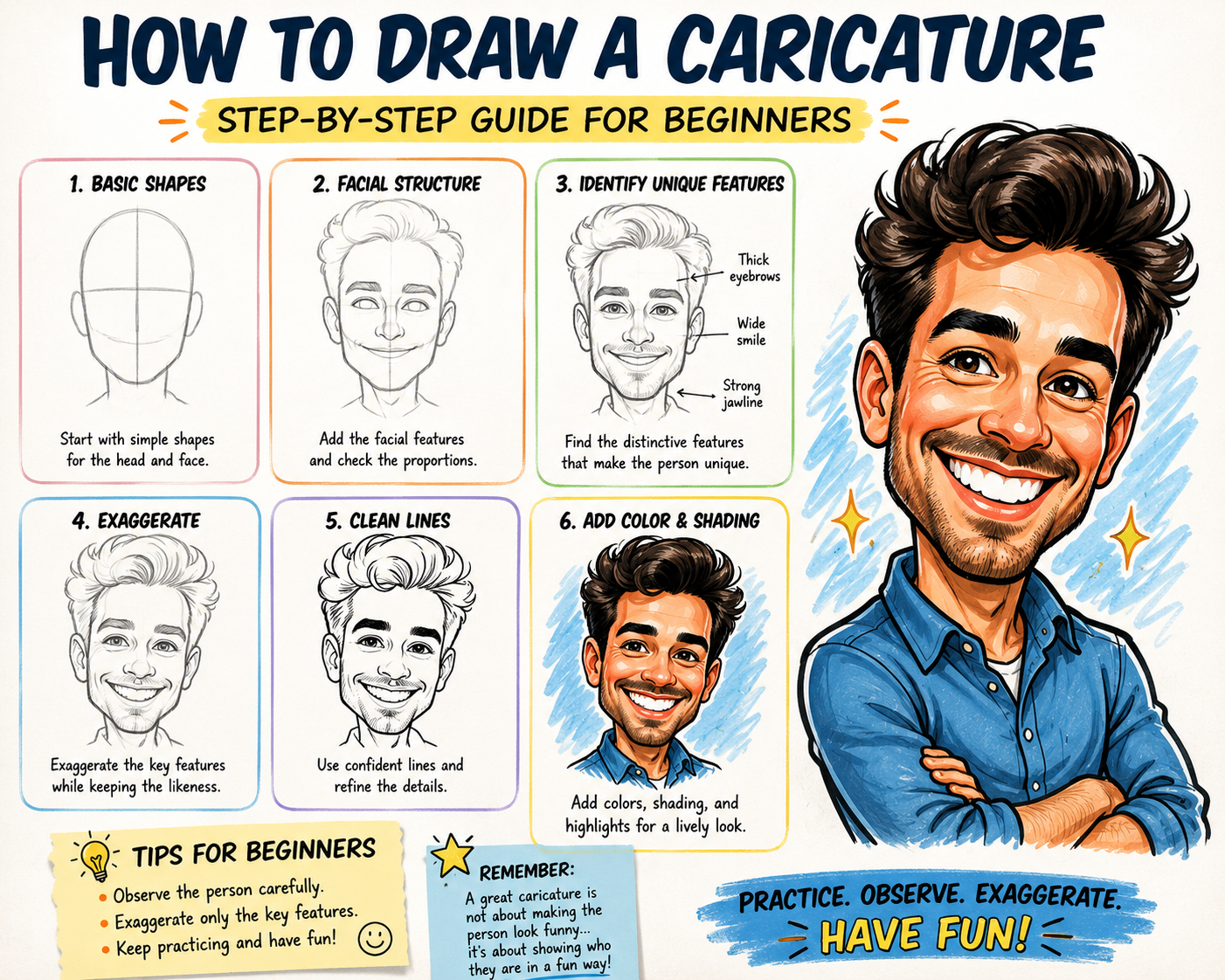
How to Draw a Caricature: Beginner Step-by-Step Guide


Learning how to draw a caricature is a fun way to combine portrait art, humor, and creative exaggeration. A successful caricature makes certain facial features larger, smaller, wider, or more expressive while still keeping the person recognizable.

You do not need to be a professional artist to begin. With careful observation, simple shapes, and regular practice, you can create funny cartoon portraits that capture both a person's appearance and personality.

What Is a Caricature?

A caricature is an illustrated portrait that exaggerates a person's most noticeable features. An artist might enlarge the eyes, stretch the chin, widen the smile, or make the hair more dramatic.

The goal is not simply to make someone look strange. A good caricature emphasizes what makes the person visually unique while preserving enough likeness for friends and family to recognize them immediately.

Materials You Need

You can start drawing caricatures with a few basic supplies:

  • Pencil and eraser
  • Sketchbook or drawing paper
  • Black pen or fine-tip marker
  • Colored pencils or markers
  • A clear reference photo

Digital artists can use a drawing tablet, stylus, and illustration software. However, the same observation and exaggeration techniques apply to both traditional and digital caricature art.

Step 1: Study the Person's Face

Before drawing, spend a few minutes studying the subject. Look for the features that stand out most.

Ask yourself:

  • Is the face round, square, narrow, or long?
  • Are the eyes large, small, close together, or far apart?
  • Is the nose wide, pointed, curved, or short?
  • Does the person have a large smile or distinctive eyebrows?
  • Is the hairstyle an important part of the person's appearance?

These observations will help you decide which features to exaggerate.

Step 2: Draw the Basic Head Shape

Begin with the overall shape of the head. Instead of automatically drawing a perfect oval, look closely at the subject's natural proportions.

A person with a wide forehead and narrow chin might be represented with a triangle-like shape. Someone with full cheeks might begin with a wide circle. A long face could start with a stretched oval.

Keep your first lines light so you can make changes easily.

Step 3: Add Guidelines

Draw a light vertical line through the center of the face. Then add horizontal guidelines for the eyes, nose, and mouth.

These lines help keep the features organized, even when you intentionally exaggerate their size or position. Caricatures can be playful, but the face should still feel connected and balanced.

Step 4: Exaggerate One or Two Features

Beginners often make the mistake of exaggerating every feature at once. This can make the drawing confusing and reduce the person's likeness.

Start by choosing one or two dominant features. For example, you might draw a larger smile and a smaller chin. You could enlarge the eyes while keeping the nose close to its natural size.

Beginner Tip: Push the exaggeration gradually. Make a feature slightly larger first, then increase it if the drawing still looks recognizable.

Step 5: Draw the Eyes and Eyebrows

The eyes are important because they communicate personality and emotion. Study their shape, direction, spacing, and expression.

Eyebrows can also add humor and energy. Raised eyebrows may create surprise, while sharply angled eyebrows can suggest confidence or determination.

Include highlights in the pupils to make the eyes feel more lively.

Step 6: Draw the Nose and Mouth

The nose can become a strong focal point in a caricature. Pay attention to the bridge, nostrils, width, and angle.

The mouth should reflect the person's natural expression. If the subject is known for smiling, make the smile one of the main features. Show the curve of the lips, visible teeth, dimples, or laugh lines.

Step 7: Add Hair, Ears, and Accessories

Hair can help make a caricature instantly recognizable. Focus on the overall shape instead of drawing every individual strand.

You can also emphasize distinctive accessories such as glasses, hats, earrings, facial hair, or a favorite necklace. These details often strengthen the personality of the portrait.

Step 8: Add a Small Cartoon Body

Many traditional caricatures combine an oversized head with a smaller cartoon body. This creates a playful and humorous appearance.

You can place the person in a pose connected to a hobby, job, or favorite activity. A golfer might hold a club, a chef might stand beside a mixing bowl, or a musician might play a guitar.

Step 9: Refine the Lines

Once you are satisfied with the sketch, trace the strongest lines with a pen or darker pencil. Remove unnecessary guidelines and clean up the outline.

Varying the line thickness can make the artwork more interesting. Use thicker lines around the outside of the head and thinner lines for smaller facial details.

Step 10: Add Color and Shading

Color can make a caricature feel more complete. Choose skin tones, hair colors, clothing, and background details that match the subject.

Add simple shadows beneath the chin, nose, hair, and clothing folds. You do not need highly realistic shading. Clean, simple color often works best for cartoon-style portraits.

Common Caricature Drawing Mistakes

Exaggerating Every Feature

Too much exaggeration can make the person difficult to recognize. Choose the most distinctive features and keep the others simpler.

Ignoring the Head Shape

The overall face shape is often more important than small details. Study the forehead, cheeks, jaw, and chin carefully.

Drawing From Memory

Beginners should use a clear reference photo. Trying to remember facial details can lead to inaccurate proportions.

Making the Expression Too Stiff

Caricatures should feel lively. Use expressive eyebrows, curved lines, and an energetic pose.

How to Practice Caricature Drawing

The fastest way to improve is to draw many different faces. Practice with family photographs, public-domain portraits, or willing friends.

Try making several versions of the same person. In one drawing, exaggerate the eyes. In another, focus on the jaw or hairstyle. Comparing the results will help you understand which features create the strongest likeness.

Practice Exercise: Set a timer for ten minutes and create a quick caricature sketch. Fast drawing can help you focus on the most noticeable features instead of becoming distracted by tiny details.

Traditional vs. Digital Caricature Drawing

Traditional drawing is useful for learning line control and observation. Digital drawing provides additional flexibility because you can resize features, undo mistakes, add layers, and experiment with color.

Neither method is better for every artist. Beginners can practice on paper first and later recreate their favorite sketches digitally.

Frequently Asked Questions

Can anyone learn to draw caricatures?

Yes. Caricature drawing is a skill that improves through observation and practice. You do not need advanced portrait experience to begin.

How much should I exaggerate a face?

Exaggerate enough to make the drawing humorous, but not so much that the subject becomes unrecognizable. Begin with subtle changes and increase them gradually.

What is the easiest feature to exaggerate?

The hairstyle, smile, nose, jaw, and eyes are often the easiest features for beginners to exaggerate.

Can I draw a caricature from a photo?

Yes. Choose a sharp, well-lit photograph that clearly shows the subject's face and expression.

Final Thoughts

Learning how to draw a caricature begins with careful observation. Study the face, identify the most distinctive features, and exaggerate them while preserving the person's likeness.

Do not worry if your first drawings are imperfect. Every sketch teaches you more about facial proportions, expressions, and visual storytelling. Keep practicing, experiment with different styles, and enjoy creating portraits that make people smile.

Caricature Related Articles

  • 20 Caricature Artist Tips for Capturing Personality
  • Best Digital Caricature Software for Funny Portraits
  • Biggest Caricature Drawing Mistakes Beginners Make
  • Caricature vs. Cartoon: What’s the Difference?
  • Fun Caricature Ideas for Families, Weddings and Gifts
  • History of Caricature Art: From Early Sketches to Digital Portraits
  • How AI Is Changing Caricature Art and Digital Portraits
  • How to Draw a Caricature: Beginner Step-by-Step Guide
  • How to Make Money Drawing Caricatures Online and at Events
  • How to Turn a Photo Into a Caricature and Keep the Likeness

Page 2 of 2

  • 1
  • 2

Policies

  • Privacy Policy
  • Terms of Service
  • Disclaimer
  • Help Desk